
When you expose a Python function to Excel as a UDF (or worksheet function), the function docstring automatically gets added to Excel and is visible in Excel's function wizard.
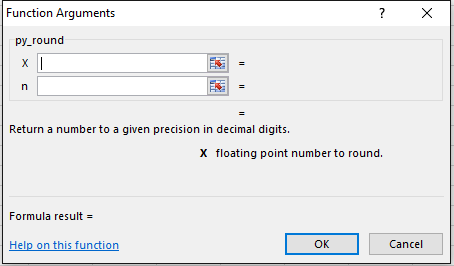
But what if you need to give more detailed documentation than can fit in this screen? You may have noticed on the function wizard screen there is a "Help on this function" link. You can use this link to reference any URL or CHM (Compiled HTML File) containing your more detailed documentation.
Linking to a URL (website)
To set the help topic for a function to a URL pass it as the "help_topic" keyword argument to the @xl_func decorator. You must use the full URL including the "http://", "https://", or "file://" prefix. You can include any query string or anchors that you need in the URL. For example,
from pyxll import xl_func

@xl_func(help_topic="https://www.google.com/search?q=pyxll")
def your_function(...):
    ....
When you examine this function in the Excel Function Wizard it will now have a link to the URL specified.
Note: Linking to URLs was added in PyXLL 5.1. In earlier versions only linking to CHM files is possible (see below).
Using a Compiled Help File
CHM, or HTML Help, files are compiled from HPP and HTML files using tools like Microsoft HTML Html (https://docs.microsoft.com/en-us/previous-versions/windows/desktop/htmlhelp/microsoft-html-help-downloads) or other third party tools.
To reference a CHM file for a specific function, when registering the function with @xl_func set the "help_topic" kwarg to the absolute path of the .chm file to load and the section of the file to open as a numeric 'help context id' in the form "filename.chm!HelpContextID", e.g. "C:/folder/help.chm!0".
If you only want to open the chm file, you still have to provide a help context id but it can be 0. The file path should be an absolute path and must be less than 255 characters long, so you may have to use a windows short path (this is a limitation of Excel).
To add context ids to your chm file you have to add aliases to your hpp file used to make the chm file, e.g.:
---- MYHELP.HHP ----
[FILES]
index.html
myfunc1.html
myfunc2.html
myfunc3.html

[ALIAS]
IDH_topic_1 = myfunc1.html

[MAP]
#define IDH_topic_1 1001
-------------------------